

Monday, 03 August, 2026г.
















Где искать: по сайтам Запорожской области, статьи, видео ролики
пример: покупка автомобиля в Запорожье
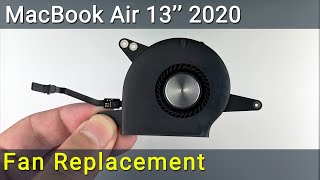
MacBook Air 13 2020 Disassembly and Fan Cleaning Guide | Easy Maintenance Tutorial
 У вашего броузера проблема в совместимости с HTML5
In this tutorial, I'll show you how to disassemble your MacBook Air model A2179 and clean the fan for optimal performance. The step-by-step guide on how to fix laptop overheating issues.
Buy tools on AMAZON-UK:
Screwdriver Set: https://hfixt.com/uk1
Opening Tool Set: https://hfixt.com/uk2
Magnetic Mat: https://hfixt.com/uk3
Tweezers: https://hfixt.com/uk4
Global AliExpress:
Screwdriver set: https://hfixt.com/alis
Opening tool set: https://hfixt.com/alit
Magnetic Mat: https://hfixt.com/amat
Tweezers set: https://hfixt.com/altz
*Useful links*
Laptop Cooling Pad Efficiency: https://youtu.be/ecgGRYfryio
More DIY repair guides: https://how-fixit.com
Follow us for more tech tutorials:
Instagram: https://www.instagram.com/howfixit/
Facebook: https://www.facebook.com/HowFixit/
Twitter: https://twitter.com/HowFixit
*DESCRIPTION*
Welcome to the MacBook Air 13 2020 model A2179 Disassembly and Fan Cleaning Guide! Is your MacBook Air running hotter than usual or experiencing performance issues, it may be time for some maintenance. In this tutorial, we'll show you how to disassemble your MacBook Air and clean the fan for optimal performance.
*Video Content:*
In this video, you'll learn:
- The essential tools you need for safe disassembly.
- Step-by-step instructions for opening your MacBook Air.
- How to access and clean the fan for improved cooling.
- Tips to prevent static discharge during the process.
- Reassembly steps to put your MacBook Air back together.
- Maintenance recommendations to keep your MacBook running smoothly.
By following our detailed guide, you can ensure that your MacBook Air 13 2020 stays cool and performs at its best. Don't let dust and debris slow you down; clean your fan and maintain your MacBook's efficiency.
Time code:
00:00 Introduction
00:12 Tools
00:46 The beginning of disassembly
00:59 How to safely open MacBook Air
01:32 Disconnecting the battery cable
01:40 Dust removal inside MacBook Air
03:30 Fan cleaning
04:00 Reassembly
AFFILIATE PROGRAM
We are a participant in the Amazon Services LLC Associates Program, an affiliate advertising program designed to provide a means for us to earn fees by linking to Amazon and affiliated sites.
#howfixit #fixit #guide #diylaptoprepair #techrepair #doityourself
Теги:
macbook air 13 2020 fan cleaning howfixit macbook air 13 2020 disassembly macbook air 13 2020 cleaning macbook air 13 2020 overheating macbook air 13 2020 maintenance macbook air 13 2020 temperature macbook air 13 2020 high cpu temperature macbook air 13 2020 how to open macbook air 13 2020 fan noise macbook air a2179 disassembly macbook air a2179 fan cleaning macbook air a2179 overheating macbook air a2179 maintenance macbook air a2179 fan noise
Похожие видео



Мой аккаунт