

Wednesday, 10 June, 2026г.
















Где искать: по сайтам Запорожской области, статьи, видео ролики
пример: покупка автомобиля в Запорожье
Arma 3 - Custom 3rd person camera mod examples
 У вашего броузера проблема в совместимости с HTML5
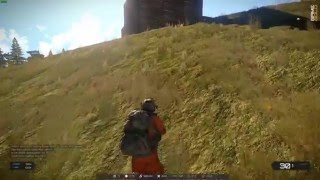
Today we take a look at a Camera mod for Arma 3. ever wanted to move the 3rd person camera? well now you can with this simple mod. I show you examples and different settings, give it a try!
MOd : http://www.armaholic.com/page.php?id=19328
Description:
Adjust the third person camera for infantry to your liking.
Bored of the standard third person view you get for infantry by default? Would you rather have it over-the-shoulder style? Or perhaps even top-down view if you're feeling nostalgic? No problem, you can adjust the camera position to whatever you desire.
Installation:
Extract into the ArmA 3 Directory, by default this is located in:
32-Bit - C:/Program Files/Steam/Steamapps/Common/ArmA 3/
64-Bit - C:/Program Files (x86)/Steam/Steamapps/Common/ArmA 3/
After extraction it should look like this:
Steam/Steamapps/Common/ArmA 3/@your_mod_folder_name
You can also use the "Arma 3 Alpha" folder in your "My Documents" folder.
Place the "userconfig" folder into your game install folder, usually:
"C:\Program Files (x86)\Steam\steamapps\common\Arma 3".
You'll also need add a Launch Parameter to Steam, in order to do so right-click on ArmA 3 Alpha and click Properties and then Set Launch Options. In the window that opens enter in -mod=@your_mod_folder_name
For using multiple mods you would then do so like this:
-mod=@mod_name;@mod_name2;@mod_name3;@mod_name4;@mod_name5
Note:
You can also use -nosplash to get rid of the splash art and intro videos.
When the above information still does not provide you with enough to learn how to install custom addons and mods you can always ask in our Guide On Installing Mods.
Included files:
dfs_3rdperson_v1.00.pbo
Usage:
This addon allows you to modify the camera positions to your liking. In order to do so you have to edit a file called cameraPosition.hpp with a text editor (such as Notepad. This file is located in ARMA 3 dir\userconfig\dfs_3rdperson.
Further explanation is in the file itself.
Server:
This is a signed addon, the serverkey is available from here.
FAQ:
Q: Game won't start - "Include file userconfig\dfs_3rdperson\cameraPostion.hpp not found." error message
A: You did not extract all files from the archive. Please follow the installation steps.
Q: Why isn't this addon signed? Will it ever be?
A: As the addon allows everyone to change their third person view camera position to wherever they want to it could be easily exploited in multiplayer. Therefore it isn't signed.
Q: I changed the values in the cameraPostion.hpp file but the view hasn't changed.
A: You must restart the game first. Sorry, sadly there is no workaround for that.
Offsets:
The Fast and the Dead by MacScottie
Based on the addon's default Over-the-shoulder view with the camera positioned closer to the center:
#define __offsetX 0.3
#define __offsetY 0
#define __offsetZ -1.2
Ghost Recon Style by Mjolnir66
This camera position is based on the third person view found in Ghost Recon, positioned on the level with the rifle, very much to the side and close to the action:
#define __offsetX 0.4
#define __offsetY -0.3
#define __offsetZ -0.6
Personal Space by Operator
Located over your shoulder but a fair distance away it is a blend of Over-the-shoulder and the default position:
#define __offsetX 0.4
#define __offsetY -0.1
#define __offsetZ -2.1
Over-the-shoulder by Deadfast
An over-the-shoulder camera created by yours truly. This is the default position found after installing the addon:
#define __offsetX 0.4
#define __offsetY -0.1
#define __offsetZ -1.2
ARMA3 Default by Bohemia Interactive
Default position of the camera in ARMA3:
#define __offsetX 0.22
#define __offsetY -0.05
#define __offsetZ -2.2
Changelog:
v2.00
- First signed release
v1.00
- Official release
Теги:
Arma Arma 2 BF3 Dice Bohimia Nvidia gaming commentaries fun humor comedy twat fps NEW lol midgets gangbang nude SLI GTX arma 3 arma 3 mod arma 3 mods mods for arma mods for arma3 3 commando 45 commando arma 3 guide arma 3 tutorials armaholic bohemia arma 3 review arma 3 workshop steam workshop
Похожие видео
Мой аккаунт