

Saturday, 19 September, 2026г.
















Где искать: по сайтам Запорожской области, статьи, видео ролики
пример: покупка автомобиля в Запорожье
Cinematic Film Look in Premiere Pro Tutorial | Cinecom.net
 У вашего броузера проблема в совместимости с HTML5
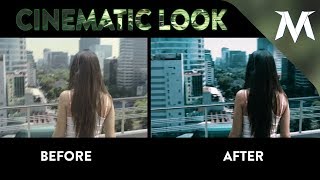
✅ Watch the REMAKE ► https://www.youtube.com/watch?v=_m-9R1oqvh0 - Learn how to create a cinematic film look and the basic philosophy behind color grading to achieve a rich-contrast image. This tutorials explains the basics of color grading.
There're enough presets online to make your videos look like a blockbuster movie. But those presets don't always tend to work out perfectly. In this tutorial video you will learn how color grading works. Not only the technical part, but also artistically.
To make a cinematic film look we must add lots of contrast. But when we increase the contrast, the detail from the blacks and the whites will overexpose. So we have to make the impression that there's a lot of contrast without pushing the blocks too much. This can be done with colors. Contrast defines two opposites, like black and white. But that could also be two colors.
When we take a look at the color wheel we can find blue and yellow being a contrast upon each other. And from a creative point of view, we can say that blue is cold and dark. And that yellow is bright and warm. So when we add blue into the shadows and yellow into the highlights, you will notice that your video has more contrast while still keeping its detail in both levels.
✅ FROM THE VIDEO
Article/Download ► https://www.cinecom.net/premiere-pro-tutorials/create-a-cinematic-film-look-in-premiere-pro/
Watch the REMAKE ► https://www.youtube.com/watch?v=_m-9R1oqvh0
✅ OUR EQUIPMENT
My Custom GH5 Camera Rig
► https://www.cinecom.net/gear/custom-panasonic-gh5-camera-rig/
Cheap Green Key Equipment
► https://www.cinecom.net/gear/chroma-key-essentials/
All the Film Gear we use
► https://www.cinecom.net/gear
✅ LETS CONNECT!
Instagram ► http://cinecom.info/Instagram
Discord ► https://discord.gg/Cinecom
Use code CINECOM at https://squarespace.com/Cinecom to get your 14 day FREE Trial
#cinecom
Теги:
premiere pro cinema cinematic film look color grade correction three-way-color-corrector tutorial how to color grading color correction hollywood look film look premiere pro color grading premiere pro tutorial color grading premiere pro color correction premiere pro cs6
Похожие видео



Мой аккаунт