

Saturday, 08 August, 2026г.
















Где искать: по сайтам Запорожской области, статьи, видео ролики
пример: покупка автомобиля в Запорожье
Flash Stock ROM+Relock Bootloader + Remove TWRP on Max Pro M1| #ROMSForMaxProM1 | TF
 У вашего броузера проблема в совместимости с HTML5
Zenfone Max Pro M1 is the only smartphone in the Zenfone Series which comes with Stock Android. Many of you guys have unlocked bootloader, flashed ROMs, Rooted your phone, etc etc. But after unlocking bootloader you may void your warranty. In order to claim your warranty back for your Zenfone Max Pro M1, you need to relock Bootloader, Remove Custom ROM and Recoveries and Unroot the phone.
So, today in this video, I will be telling you how to flash Original Stock ROM on Zenfone Max Pro and claim your warranty back (only if you have unlocked Bootloader UNOFFICIALLY).
⬇️ Files to Download:
1️⃣ Unlock File: http://bit.ly/UnlockX00TD
2️⃣ Relock File: http://bit.ly/RelockX00TD
3️⃣ Stock ROM (247 firmware): http://bit.ly/StockX00TD
4️⃣ Stock ROM (334 firmware): http://bit.ly/2V00qax
5. Stock ROM (059 Firmware): https://androidfilehost.com/?fid=4349826312261609930
You can learn the way to Install Zenfone Max Pro M1's USB Drivers on Windows by watching this video: https://youtu.be/SiW1SwUGP7U
How to setup ADB on a Windows System: https://youtu.be/Eq1_rmMVC_A
➡️ Steps to Flash ROM:
What to do first?
a. On PC
1. Download all 3 files and extract all the files in a separate folder.
2. Make sure that your PC/Laptop has woking ADB and Fastboot Drivers.
3. Make sure that you have installed all the Zenfone Max Pro M1's USB Drivers properly on PC/Laptop.
b. If your phone is WORKING:
1. Charge your phone to 50%.
2. Take a backup of your existing data on Internal Storage as this procedure will wipe all the data on Internal Storage
3. Remove all your SD Card and SIM Cards.
4. Remove all the Passwords, PIN or Patterns and set Default Screen Lock method to Swipe.
5. Go to Settings, then System, then About Phone and tap the Build Number 7 times to enable Developer Options.
6. Open Settings, then System, then Developer Options and enable USB Debugging.
c. If your phone is NOT WORKING:
1. Try to charge the phone above 50% or keep it for charge for 2-3 hours.
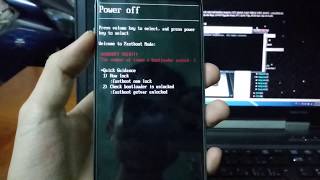
2. Boot to Fastboot Mode by holding Power + Volume Up Button for Sometime until you see the "Powered by Android" screen
B. Relocking the Bootloader
1. Now here the procedure for both Working and Non-working Zenfones are same.
2. Connect the phone in Fastboot Mode via USB cable to PC.
3. Run the Relock.bat file to Lock Bootloader.
4. The phone will reset itself automatically and will boot again to normal mode. Power off the phone and again boot to Fastboot Mode by holding Power + Volume Up Button. (If the phone boots to TWRP recovery, then tap Reboot and then Bootloader)
C. Flashing the Stock ROM
1. Again the procedure is same for both Working and Non-working Zenfones.
2. Open the folder named [Tuser.com]... and copy or move the files to 'adb' folder (available in C: drive of Windows)
3. If a promt comes up and asks you to replace the 'fastboot.exe' file, then click Replace
4. Make sure that you have connected your Zenfone with PC via USB cable
5. Finally run the 'flashall_AFT.bat' file, so that the Stock ROM finally gets flashed on Zenfone Max Pro M1.
? Now your Zenfone Max Pro is under warranty and will get OTA Updates (Only if Bootloader is unlocked Unofficially). Your bootloader is now locked, phone is Unrooted.
? Video Cameras used in this video:
Laptop Screen: #ShotonSamsungGalaxyOn7Pro
Remaining Part of Video: #ShotonAsusZenfoneMaxProM1
Get the Blazing Fast and the Best Smartphone in the Price Range of ₹10000 to ₹15000 : http://bit.ly/ZFMPM14GB64GB
? Send me your question and suggestions on [email protected].
? Leave a like and also Subscribe to my channel for more videos...
? Thanks for Watching this Video.
➡️ For Tech Fibre:
➡️ Instagram: https://www.instagram.com/TechFibreTF/
➡️ For Me (Shashwat Singh)
➡️ Instagram: https://www.instagram.com/shashwatsingh_official
#BeTheBest #TechFibreTF
Теги:
Shashwat SIngh ANdroid Windows technical guruji tech fibre techfibretf tech beeobom chrome asus Zenfone max pro API Google Camera steps you should take brfore selling old Chrome's Incognito Mode's Test Secure Not Tech Fibre How Enable EIS Stock google pixel slate home hub Google pixel 3 unlock bootloader and flash TWRP pixel 3 camera Android Pie official whatsapp stickers custom stickers flags stock ROM relock remove twrp
Похожие видео
Мой аккаунт