

Thursday, 18 June, 2026г.
















Где искать: по сайтам Запорожской области, статьи, видео ролики
пример: покупка автомобиля в Запорожье
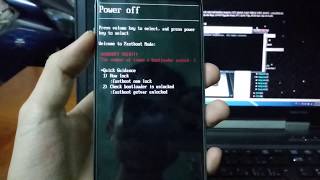
How to install ClockWorkMode on HTC ChaCha using Fastboot (Nizar's Tutorials)
 У вашего броузера проблема в совместимости с HTML5
Hello everyone ! Here you will find all what you need to install ClockWorkMode Custom Recovery :)
(Attention Please, those kind of modifications are deep in to your system, and by doing so, you partly or totally invalidate your warranty and they might be a possibility and risk of messing out with device's software, or losing data, and in the worst cases, they might be a Brick "unresponsive phone with a corrupted software", this is a warning, do everything with caution and at your own risk.)
★ The requirements for this installation are:
➊- Having a "Bootloader" unlocked.
(if you don't have it click here http://www.htcdev.com/ and go to the option "unlock bootloader" select your phone model, and then from there follow the instructions)
➋- The Mobile Rooted.
If you don't have it, here under is all you need.
➤ download the latest "DooMLoRD's Easy Rooting Toolkit"
From Here http://forum.xda-developers.com/showthread.php?t=1321582
➤ and follow the instructions from here
http://theunlockr.com/2012/12/10/how-to-root-the-htc-chacha/
any way i will hopefully upload a tutorial video, so don't worry :)
Note: You must follow the order up here, if you do not unlock the bootloader first you can not do anything.
★ If you have the requirements listed above, go ahead and download the file from here:
Fastboot + ADB + CWM 5.0.2.8 for HTC Chacha:
https://www.dropbox.com/s/fs06gnongg1nzom/Fastboot%20%2B%20ADB%20%2B%20CWM%205.0.2.8%20for%20HTC%20Chacha.rar
Note: The Recovery.img file inside the toolkit is ONLY FOR HTC CHACHA, if you need a recovery image compatible for your phone search for it here, just click on "Find your device" in the search bar, and then in *your phone name* Android development
http://forum.xda-developers.com/index.php
★ IMPORTANT (For Newbies):
I recommend everyone to click on the link below to learn things that will be very useful, you will find an explanation to all the most common terms that you will better understand what you are doing (I suggest you print it out, so as to have at hand if there any term you do not understand). And this for me is the most important, if you do not know what you're hacking into the system of your phone, you will eventually make trouble.
Never do anything you're unsure but instead find out beforehand, and do not install anything that is not compatible with the model of your phone that you'll certainly BRICK IT! Here is the link.
http://www.talkandroid.com/guides/beginner/android-rom-and-rooting-dictionary-for-beginners/
★ Finish, Please give me a positive comment-feedback if your installation is successful :)
For any additional info about the recovery, here you can find the source:
http://forum.xda-developers.com/showthread.php?t=1481135
Теги:
Fastboot adb how to how android root rooting CWM Rom recovery custom Hboot Unlock HTC install flash clock work mode clockworkmode cha chacha bootloader boot fast nandroid backup android SDK SDK Sd card memory overclock cmd usb cable computer zip tutorial Phone come installare jak zainstalować jak one desire bios
Похожие видео



Мой аккаунт