

Monday, 08 June, 2026г.
















Где искать: по сайтам Запорожской области, статьи, видео ролики
пример: покупка автомобиля в Запорожье
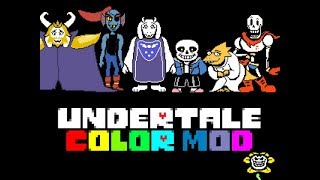
How to Install the Undertale Colored Sprites Mod (Easy)
 У вашего броузера проблема в совместимости с HTML5
If you’ve ever wanted to change the look of Undertale boss fights and avatars from black and white to color, you’ve come to the right place.
--------------------
Download Link: https://www.mediafire.com/file/2rnpzdnv380tx2b/Undertale+Color+Mod.zip
--------------------
Download the .zip folder which we’ll be extracting with WinRAR.
Right click on Undertale in steam and click on “properties”, and then the “beta” tab.
In the dropdown, select “old version 100” and click close to download the old version of the game.
Right click on Undertale in Steam and click on “properties” again, and then the “local files” tab, and then “Browse local files”.
Right click on Undertale.exe and extract it to a folder using WinRAR, and then drag this new folder to the desktop or wherever you want.
Open the folder and delete the “data.win” file.
Drag the new “data.win” file from the .zip folder into the folder.
Right click on “Undertale.exe” and create a shortcut and place it on the desktop or wherever you want.
Lastly, delete the “steam_api.dll” file.
--------------------
Once you click on the shortcut, the game should now show the bosses and avatars in color.
If you have any questions, please comment and I’ll try to answer it.
--------------------
Twitter: https://twitter.com/FirstMateKlover
Теги:
Klovers Klovers TF2 TF2 Klovers Undertale Undertale Color Mod Color Mod Undertale in Color Undertale color Sans colored Sans data.win color mod Undertale mods Undertale colored colored sans color undertale colored sprites undertale colored sprites mod colored sprites mod undertale mod undertale (colored sprite mod)
Похожие видео

Мой аккаунт