

Thursday, 04 June, 2026г.
















Где искать: по сайтам Запорожской области, статьи, видео ролики
пример: покупка автомобиля в Запорожье
Primavera P6 Tutorial : Chapter - 2.2 : Getting Started - EPS,OBS || dptutorials
 У вашего броузера проблема в совместимости с HTML5
In this Chapter, let us understand Enterprise Project Structure EPS and Organization Breakdown Structure -OBS, and how to develop, create and add them in Primavera .
Enterprise Project Structure - EPS is nothing but a cluster of projects. Database of projects arranged in a hierarchy is called as EPS. EPS can be sub-divided into many levels or nodes as needs to work parallel. Projects are the lowest level of hierarchy in EPS structure. You can summarize the projects for each node in the EPS.
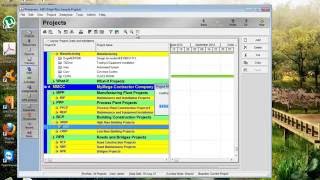
To View EPS- On the Home Screen, click on the Projects tab to view the EPS nodes or Projects.
To Create or Modify EPS- Go to Menu Bar and select Enterprise- Enterprise Project Structure... and then in the next window click on Add to add any EPS Node and use the arrows to adjust the level of node. You can delete any unwanted EPS node by clicking on Delete button. You can Cut and paste the EPS to change or modify the position of the EPS node.
You can filter the Projects in the EPS by status using the Filter Function. You can re-position the EPS Nodes by using the drag and drop function.
Organizational Breakdown Structure - OBS represents the management responsible for each project. Each area manager in the EPS node is responsible for his area of EPS, either by node or by project and WBS of the particular hierarchy.
The OBS hierarchy is also used to grant users specific access privileges to projects and the WBS levels within projects.
To View OBS: You can view an OBS as a chart or a table. Choose Enterprise, OBS, to open the Organizational Breakdown Structure dialog box.
View the OBS chart: Click the Display Options bar- Chart View. To change the information in the chart, click the Display Options bar and choose Chart Box Template,Customize.
To Create OBS: Choose Enterprise, OBS. Select the OBS element immediately above and of the same hierarchy level as the element you want to add, then click “Add”.
You can edit, delete move in this same window.
For Personalized detail learning, write to [email protected]
If you found this video valuable, give it a like. If you know someone who needs to see it, share it. Leave a comment below with your thoughts. Add it to a playlist if you want to watch it later.
***********************************************
★ My Online Tutorials ► https://www.dptutorials.com
LEARNING RESOURCES I Recommend: https://www.dptutorials.com/resources
Subscribe for more Awesome Tutorials: http://goo.gl/NyAtg2
Support the Channel via shopping: http://ift.tt/2jH38PR
Tools that I use for Vlogging:
• Laptop: https://amzn.to/2E5U3MO
• Canon 200D Camera: https://amzn.to/2HglDYA
• Benro Tripod: https://amzn.to/2ExRvYj
• Blue yeti microphone: https://amzn.to/2VwZyPn
• Collar Microphone: https://amzn.to/2VyOdcM
• Bluedio Headset: https://amzn.to/2W3xUZX
• Screen recorder: https://techsmith.pxf.io/2BMjA
• Boom Arm Stand: https://amzn.to/2VCQNi7
• Zoom H1 Audio Recorder: https://amzn.to/2VDumsT
• Harison Softbox Studio Lights: https://amzn.to/2LY7x3u
• Chroma Key Green Screen: https://amzn.to/2ExTr31
• Background Support Stand: https://amzn.to/2McqnEv
• Acoustic Foam Background: https://amzn.to/2EoQ1zj
• USB RGB LED Strip: https://amzn.to/2VItKm4
• Wireless Mouse: https://amzn.to/2E23cpN
Note: This description contains affiliate links, which means at no additional cost to you, we will receive a small commission if you make a purchase using the links. This helps support the channel and allows us to continue to make videos like this. Thank you for your support!
***********************************************
You Can Connect with Me at:
YouTube: www.youtube.com/c/dptutorials
G+: http://ift.tt/2kAOpa6
Twitter: https://twitter.com/dptutorials15
Facebook: http://ift.tt/2kfRnDi
BlogSpot: http://ift.tt/2kB14dh
Follow:
www.dptutorials.com
www.askplanner.blogspot.com
Tags: -
P6:
primavera p6 training online, primavera p6, primavera p6 training, primavera p6 tutorial, oracle primavera, primavera p6 download, primavera 6, oracle primavera p6, primavera p6 free download, primavera project management, primavera project planner, primavera download, primavera online, primavera training, primavera software free download, youtube primavera, primavera tutorial, is primavera online easy, p6 online, primavera p6 complete video tutorial free download, critical path, oracle primavera, primavera p6, primavera, primavera software, construction project management software, project management software, project management books, microsoft project, project management courses, project management certification, online project management, project management tools, free project management software, project management training, best project management software, pmp certification, free project management tools, project management apps, microsoft project management, project management professional certification, google project management, ms project, agile project management
Теги:
PRIMAVERA primavera p6 s curve in primavera p6 primavera p6 s curve primavera p6 obs primavera eps obs in primavera what is eps in primavera eps in primavera
Похожие видео

Мой аккаунт