

Friday, 05 June, 2026г.
















Где искать: по сайтам Запорожской области, статьи, видео ролики
пример: покупка автомобиля в Запорожье
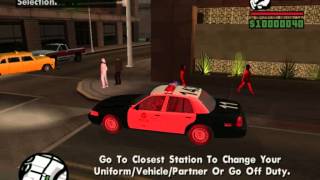
SAPD:FR Pullover
 У вашего броузера проблема в совместимости с HTML5
hey guys CeneteredTugBoat here just wonted to show you a new mod that came out called SAPD:FR
http://www.gtapolicemods.com/
Downloads:
SAPD:FR:
http://www.gtapolicemods.com/index.php?/files/download/1202-san-andreas-police-department-first-response-sapdfr/
http://www.mediafire.com/?s14vwu3c3539lbs
Car:
http://www.gtapolicemods.com/index.php?/files/file/186-royal-canadian-mounted-police-rcmp-ford-crown-victoria-2006/
Made by canadapolice
Siren:
http://dc247.4shared.com/download/DBfPMO8d/Cason_SA-361_10.zip?tsid=20111124-004452-a2b229b
Engine:
http://dc153.4shared.com/download/vqzLmar3/Chevy_Impala_Sound_Mod.rar?tsid=20111123-222815-44db2a42
How To Use:
Press 'P' to bring up the Cop Menu.
Only select the Police Pursuit, Traffic Stop, or Domestic Dispute.
Pursuit:
NumPad
- Press "NumPad 0" while suspect is driving to make him exit car
- Press "NumPad 1" to call for backup; Backup spawns randomly around the suspect; Can spawn up to 9 units;
- Press "NumPad 3" to call for Spike strips; Spikes only affect the suspect's car
- Press "NumPad 4" to call for Roadblock,
- Press "NumPad . (Period)" to call for helicopter
No NumPad
- Press "4" while suspect is driving to make him exit car
- Press "6" to call for backup; Backup spawns randomly around the suspect; Can spawn up to 9 units;
- Press "8" to call for Spike strips; Spikes only affect the suspect's car
- Press "9" to call for Roadblock,
- Press "7" to call for helicopter
Traffic Stop:
- Go behind a car and press '\'. (between the enter & backspace key)
- The car will pull over.
- Get out your car and walk to the red sphere.
- Follow the onscreen commands.
Domestic Dispute:
- Go to the marker on the radar.
- You will see 2 people fighting.
- Aim at one of them or press '7' for backup.
- Follow the onscreen commands.
Speed Radar:
- Get in a car.
- Press the "Conversation Yes" key. (default Y)
- A sphere will spawn and use mouse to position the sphere.
- Press "Conversation Yes" key again to set the sphere.
- Let traffic drive through sphere and it will read the cars speed and how many passengers are in the car.
- The display will be in the upper left corner.
- Press "Conversation No" key to disable the sphere. (default N)
CeneteredTugBoat
Теги:
France Front-engine
Похожие видео
Мой аккаунт