

Thursday, 06 August, 2026г.
















Где искать: по сайтам Запорожской области, статьи, видео ролики
пример: покупка автомобиля в Запорожье
Unbrick Asus transformer TF101 with Easyflasher windows 8 (1)
 У вашего броузера проблема в совместимости с HTML5
How to Unbrick your asus transformer tf101.
I want to give credit to whitekindey @ xda for a great tool that works.
Please, this video is purely on my experience and using my own gear.
If you do brick you TF101 I should not be held responsible and you should do this at your own risk.
NOW download this here
1. EASYFLASHER with Asus 9.2.17 http://dl.dropbox.com/u/94267097/EasyFlasher-0.8.3b-STABLE.zip or http://www.4shared.com/zip/UKBP--la/EasyFlasher-083b-STABLE.html
2. APX drivers http://dl.dropbox.com/u/94267097/Universal_Naked_Driver_0.72.zip
or http://www.4shared.com/zip/5-npIrfP/Universal_Naked_Driver_072.html
3. Alternative usb drivers http://www.4shared.com/zip/f6EDO1OQ/usbpcdriver.html
First take out the driver signature security from windows 8 -
Second plug in your device to your computer and put into APX mode {hold power and volume up for 15 sec}
Look at the device manager and install the APX drivers
Put the Official ASUS rom in the asusupdate folder.
Make sure you use the 9.2.1.17
TURN THE VOLUME UP ON YOUR COMPUTER!
This is the only way that you will know if you successfully know if you are into APX mode
Put your computer again into APX mode.{1st time to load drivers, 2nd to unbrick}
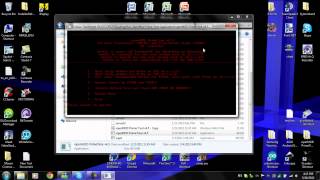
Start Easyflasher and click on either SBK.. I used SBK2
Click on Unbrick/ Flash Rom
WAIT AND BE PATIENT...Make sure your transformer has enough battery to get through this. It would be around 15mins {that's my computer}
And That's IT!! I Hope this helps you coz it did for me!
Теги:
Asus tf101 unbrick transformer bricked clockworkmod stuck brick asus broken does not work bootloop not working unroot apx problems reset tablet hack how to undo
Похожие видео
![Asus TF300T_TWRP ile Yükleme [ROM][N 7.1.2] [ KatKiss - Nougatella #036 ]_Part 1](/images/mq/4/a9/6O-ptBWM4KyPI5.jpg)
Мой аккаунт