

Sunday, 09 August, 2026г.
















Где искать: по сайтам Запорожской области, статьи, видео ролики
пример: покупка автомобиля в Запорожье
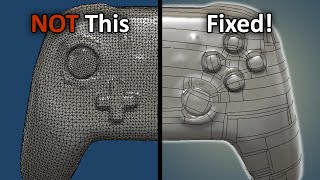
How to convert existing STLs into "sculptable" objects for editing in Fusion 360
 У вашего броузера проблема в совместимости с HTML5
This video demonstrates downloading an STL from Thingiverse, opening it in Fusion 360, saving as .obj, opening with "Instant Meshes Windows", refining the mesh into quads, exporting as .obj, then reimporting into Fusion 360, converting to t-spline, then converting t-spline back to brep (to make sure topology is okay), if it's not, try to repair it (if that doesn't work, go back to Instant Meshes and change parameters), then if the repair works, and you can convert to brep that you can export as STL, *then* go back to the tspline and modify in sculpt mode, THEN convert back to brep, then export that as an stl. :-)
Теги:
fusion 360 fusion360 stl sculpt sculptable BREP T-SPLINE makerspace columbus idea foundry idea foundry alex bandar conversion export import
Похожие видео

Мой аккаунт